Say Goodbye to Tedious Bank Reconciliation
With just a click, Auto Bank Reconciliation seamlessly connects your SQL Account to Maybank's secure feed.
No More
Manual Cross-Checking
No More
Downloading PDFs
One-Click with
Complete Security
For SQL & Maybank SME Users
Seamlessly connect your Maybank Business Accounts to SQL Account for automated accounting process, real-time cash flow management, enhanced business efficiency, all within a secure banking environment.
Enjoy the Benefits
Securely connect SQL Account with Maybank
Initiate payments directly from SQL Account
Automate bank reconciliation with Maybank SME Accounts
Don’t Have Maybank Business Account yet?
Open your Maybank Business Account today! Whether you’re a sole proprietor or not, signing up unlocks a comprehensive platform designed to empower your business. Here’s what you’ll enjoy:
Sole Proprietors
Enjoy seamless integration between your personal and business finances with our dedicated platforms:
Non-Sole Proprietors
For partnerships and private limited companies, leverage powerful mobile solutions to keep your business moving:
Click the button below to start your application. Maybank will recommend the most suitable business account for your needs.
Get FREE SQL Cloud Accounting!
Auto Bank Reconciliation is available now for FREE to all Maybank account holders and SQL Accounting software users!
Sign up now to get FREE 6 months of SQL Cloud Accounting, no risk, no credit card required.
SQL Account Top Features
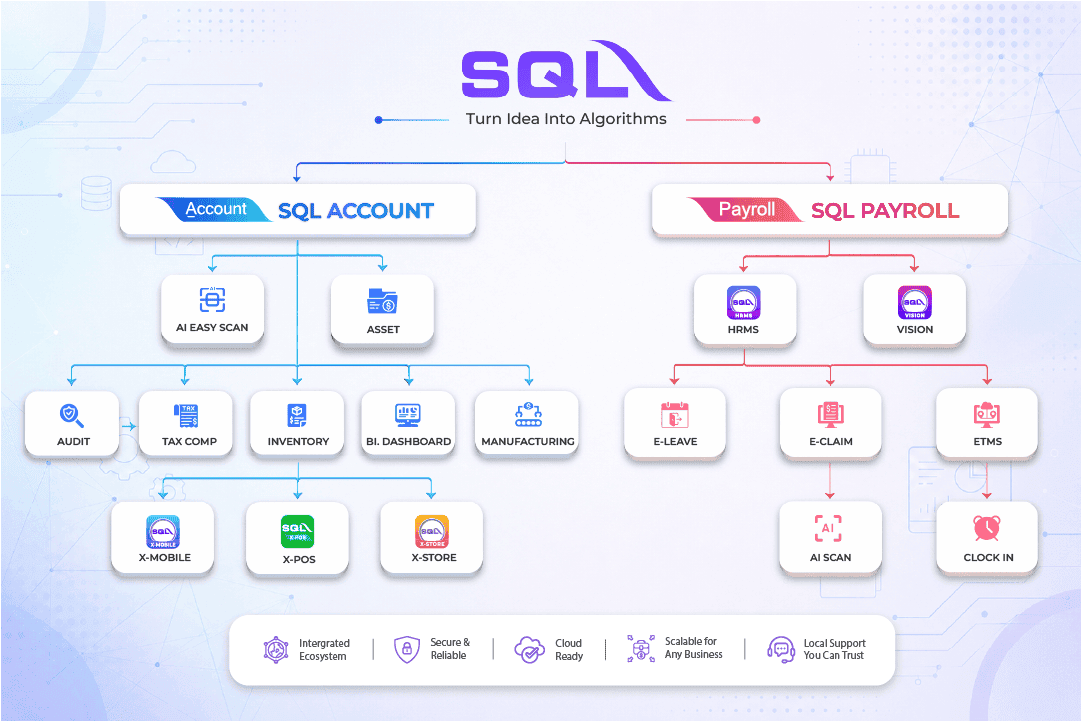
SQL Account is accounting software designed for all businesses, from small enterprises to large organizations.
Find the right business solution that fits your needs.
Access Anytime, Anywhere
Access your account and manage your business from anywhere, at anytime.
Batch Email Statements
Send statements to each customer individually with password protection in just one click.
Maybank Integration
Experience automatic reconciliation through the seamless integration of SQL with Maybank2u and Maybank2u Biz.
Real-Time CTOS Company Overview Reports
Get an overview of your customers’ and suppliers’ financial standing to make informed business decisions.
Advanced Security Locks
Restrict access to sensitive documents, such as hiding salaries in the cash book, with advanced security controls.
Intelligence Reporting
Generate detailed reports, including commission collections, top 3 profitable customers, and yearly profit & loss comparisons.
Maybank SME Customer Special Offer
This exclusive offer is only for Maybank SME account holders who subscribe to a new SQL account.
Maybank Auto Bank Reconciliation
Learn how to connect your Maybank Business Accounts to SQL Accounting
About Maybank Auto Bank Reconciliation
We understand that a business’s needs go beyond just banking, and we aim to make running and growing your business easy and efficient by securely integrating with third party solution providers to collaborate in creating features that would solve your pain points across a range of industries. For example – we first partnered with accounting service providers to automate the currently manual process of bank reconciliation (recon) by transmitting Maybank account transaction records to our accounting partners for auto bank reconciliation all on one platform.
By partnering with Maybank, these chosen accounting providers bring you an auto-recon function that dramatically frees up your time and effort. Link your Maybank SME CASA accounts to perform auto bank recon on the accounting partner’s platform at the click of a button. This process requires minimal human supervision and manual intervention hence allowing your business to increase speed, efficiency, and accuracy by eliminating bookkeeping tasks.
As a Maybank SME CASA account holder, you will be eligible to link your account(s) to enjoy the Auto Bank Recon feature.
Please refer to this cheat sheet for further information.
Any of your SME / Business Current and Savings accounts (both Conventional and Islamic) may be linked to our selected accounting service provider platforms.
By connecting your Maybank account to your accounting service provider, you can run your business with less worry and more efficiency. By linking your bank feed, your accounting software will be able to retrieve your Maybank SME business account transactions and initiate an auto-reconciliation with little to no manual work. The auto-reconciliation process matches your bank transactions to your ledger values to ensure smoother bookkeeping.
By linking your bank feed directly to your accounting service provider, you will be better able to track your cash flow, detect fraud, detect bank errors, and stay on top of your accounts receivable.
Please use the BRN no. that you have registered with Maybank.
Please ensure that the BRN number that you have entered, matches the BRN number you have registered with Maybank.
To update your BRN no. with Maybank, you will need to pay a visit to the closest Maybank Branch in your area. Once there, our dedicated branch staff will assist in updating your BRN No.
If your accounting service provider is partnered with Maybank, you will be able to link your Maybank account(s) to use this auto-reconciliation feature.
Linkage Flow - Sole Proprietor
Follow the steps below to link your account:
Step 1: Log in to your accounting service provider's platform.
Step 2: Locate the Maybank link or connect button (Please refer to your accounting service provider's FAQ/journey if further clarity is needed).
Step 3: Click to “Connect” and you will be redirected to Maybank's secure platform for further identity verification/authentication.
Step 4: Log in using your Maybank business account ID and password.
Step 5: Read the snapshot summary of terms of use and click "Proceed to link".
Step 6: Choose a maximum of three accounts to link and confirm.
Step 7: Authorise your Secure2u and once verified, the link will be established. You may return to the accounting provider platform to perform auto-recon.
Linkage Flow - Non-Sole Proprietor
Follow the steps below to link your account:
Step 1: Maker to log in to your accounting service provider's platform.
Step 2: Maker then needs to locate the Maybank link or connect button (Please refer to your accounting service provider's FAQ/journey if further clarity is needed).
Step 3: Maker will click to “Connect” and you will be redirected to Maybank's secure platform for further identity verification/authentication.
Step 4: The Maker will then log in using their Maybank business account ID and password.
Step 5: Read the snapshot summary of terms of use and click “Proceed to link”.
Step 6: Choose a maximum of three accounts to link and confirm.
Step 7: Maker needs to authorise their Secure2u/SMS TAC and once verified, a notification will be sent to the Checker for approval.
Step 8: The Checker will then need to log in to their existing M2U BIZ app and approve the Linkage request now listed under the “Approvals” section.
Step 9: Once Checker has authorised via Secure2u, the linkage will be established. You may return to the accounting provider platform to perform auto-recon.

You’ll only have to link once to enjoy unlimited use of the Auto Bank Recon feature.
Maybank and your accounting service provider work together to ensure your data is transmitted safely and securely using systems audited regularly to comply with industry standards. In order to establish a link, you will be required to login securely using your Maybank username and password for identity verification. Our system flows have been subject to rigorous testing and scrutiny, and include further identity authentication from the backend as well as Secure2u.
Once successfully linked, the accounting service provider will receive the latest transaction records from Maybank, ensuring an up-to-date reconciliation.
This auto-recon feature is included in the cost of your accounting software application. Please refer to your accounting service provider for their respective terms and conditions.
*No handling fees/commission are paid to any agent/advisors and/or Maybank employees.
Yes. Businesses may link up to minimum of one and maximum of three SME CASA accounts to their accounting software service provider, as long as all three accounts are under Maybank.
You can check the status of your linked accounts on the M2u website(Sole Props) or M2U Biz App (Non Sole Prop). You may also view the status of your linkage on the accounting service provider’s platform. A “Connected” status label means you have successfully linked your Maybank account(s) to your accounting service provider.
No. Your accounting service provider will not have any type of access to your bank account, nor be able to utilise it in any way.
Yes. You may unlink your accounts any time, via either Maybank’s or your accounting service provider’s platform. Note that unlinking your account will mean you have to go through the linkage journey again if you’d like to continue using the bank auto reconciliation feature.
Here are some guidelines you might find helpful:
Un-Linkage Flow - Sole Proprietor
Sole Props can unlink from the M2U Internet banking platform by following the steps below:
Step 1: Log into your Maybank business account via M2U.
Step 2: Go to Settings and navigate to the Pay & Transfer tab.
Step 3: Select Linked Accounts within the left side menu.
Step 4: Under the Other Partner Services section, select the More Actions icon.
Step 5: Click to unlink, and confirm with S2u to complete the un-linkage process.
Un-Linkage Flow - Non-Sole Proprietor
Non-Sole Props [Checker-Role] can unlink from the M2U Biz App by following the steps below:
Step 1: Checker logs into their existing M2U BIZ app.
Step 2: Go to the Menu Bar > Settings and navigate to the Linked Accounts tab.
Step 3: Select the partner name and linked account, then click on the unlink button.
Alternative: Checker can also swipe to the left and click the unlink icon.
Step 5: Checker will then confirm with S2u to complete the process.
Un-Linkage Flow - Partner Platform
To unlink from your accounting service provider’s platform, please proceed to their homepage and follow the instructions on their FAQ page.
Of course. Once your client links their chosen Maybank account(s) to the accounting service provider, you may start to use auto bank recon. Business owners are advised to give consent to their external accountant at their own discretion.


Contact Us Today
Get a FREE DEMO. and see how SQL Account works for your business

+603 7890 1299
sales@sql.com.my
Testimonial
Our Customers
More than 320,000 companies use SQL Account & SQL Payroll for business daily operation


Inquiry
Inquiry form
Let's get in touch!
We are ready to serve anytime.